 LumenSmith

Lightweight, configurable recipe management for Paper and Purpur servers, now with brewing-stand recipes and a fully redesigned in-game creator.
What is LumenSmith?
LumenSmith is a beginner-friendly plugin that lets you disable,
replace, and create crafting, cooking, smithing, stonecutting and
brewing recipes entirely through an in-game GUI or a simple config.yml.
No coding, no datapacks. Just type /ls and click.
Version v0.1.5 adds the 10th recipe type (brewing), reorganises the recipe creator into clean sub-menus, ships a quick-create / delete-mode toggle inside the browser, makes auto-unlock instant the same tick the trigger item arrives, and lands a sweep of security and reload-safety fixes.
Key Features
10 Recipe Types
Shaped, shapeless, furnace, blasting, smoking, campfire, stonecutting, smithing transform, adjacent pair, and now brewing.
Categorised Recipe Creator
The creator opens with 5 grouped categories (Crafting, Cooking, Stonecutting, Smithing, Brewing) and drills into sub-menus. No more wall of icons.
Block Vanilla Recipes
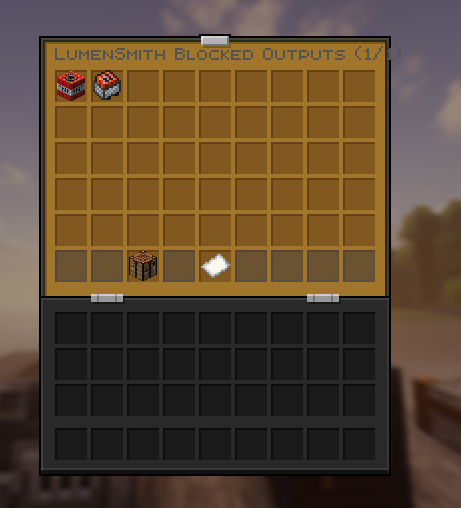
Prevent items like TNT or Ender Chests from being crafted. Manage the blocked list in config.yml or live from the in-game browser.
Fast Create & Delete
Quick-create button right inside the browser (chat-prompts for the key), plus a Delete Mode for shift-click bulk cleanup.
Real-Time Auto-Unlock
Recipes appear in the recipe book the same tick a trigger item enters the player's inventory. Pickups, crafts, /give, shift-clicks out of chests: all instant.
Permissions & Cooldowns
Require permissions, set cooldowns, cap total crafts per player. Defense-in-depth checks across every consume path.
World Filter
Enable or disable crafting rules per world. Perfect for SMP / RPG / creative-vs-survival setups.
Reload-Safe
Deleting a recipe and reloading restores any vanilla recipe it replaced. No server restart needed.
Ultra-Lightweight
Async-safe cooldown saves, O(1) fuel lookups, holder-based GUI routing, no per-tick overhead.
Supported Crafting Stations
LumenSmith hooks into every vanilla crafting station the game ships with, plus a custom adjacent-pair type that uses the regular crafting grid. One configuration file, ten recipe types, all of these blocks covered:
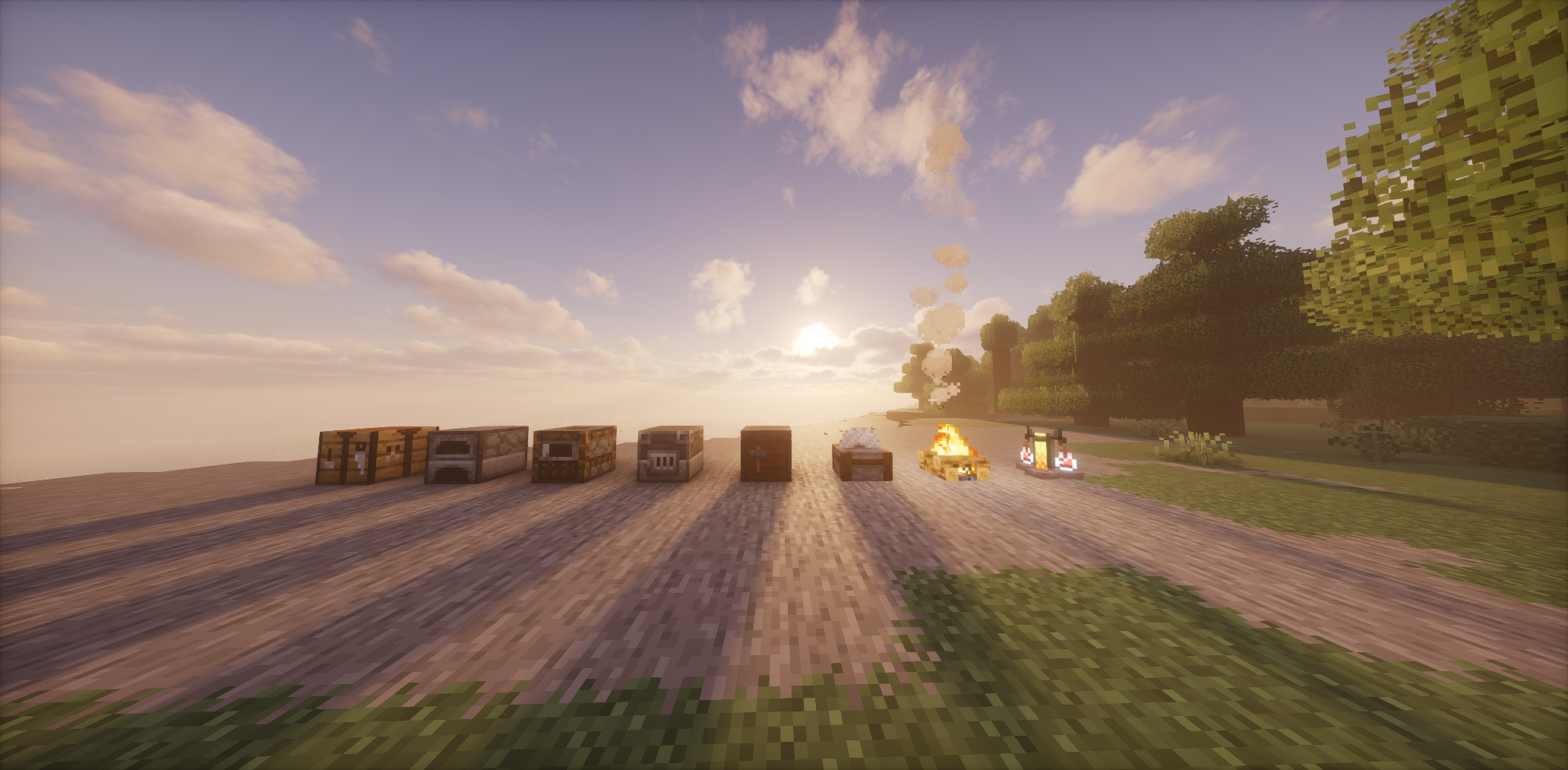
| Station | Recipe types |
|---|---|
| Crafting Table | shaped, shapeless, adjacent_pair |
| Furnace | furnace |
| Blast Furnace | blasting |
| Smoker | smoking |
| Campfire / Soul Campfire | campfire |
| Stonecutter | stonecutting |
| Smithing Table | smithing_transform |
| Brewing Stand | brewing NEW v0.1.5 |
How Auto-Unlock Works
LumenSmith decides when a custom recipe should appear in a player's recipe book
using the auto_unlock_on field. The plugin watches every way a player
can pick up an item and, the moment a trigger material lands in their inventory,
the relevant recipe is added to the book.
Two ways to set the trigger
You don't have to think about this for most recipes; the default is sensible.
- Auto (default): omit
auto_unlock_oninconfig.yml, or leave the Knowledge Book button on its "Auto" setting in the GUI. The plugin uses every ingredient in your recipe as a trigger. Get any one of them, the recipe appears. - Custom list: provide a YAML list, or click the Knowledge Book in the editor and pick the exact materials you want. As soon as the player obtains any one of those materials, the recipe shows up.
What counts as "obtaining" a trigger
Recipe unlocks fire the same tick a trigger item lands in the player's inventory through:
- Picking up an item from the ground
- Crafting an item (workbench result on cursor or shift-clicked into the inventory)
- Shift-clicking out of any container: chest, shulker, ender chest, hopper, villager trade, furnace output
/give(including the namespaced/minecraft:giveform)- Joining the server (rescan of every existing trigger material)
- Hopper output, dispenser drops, item frame removal, etc.
Example: only unlock when the player finds something rare
- key: "ancient_blade"
  type: "shaped"
  shape:
    - " D "
    - " D "
    - " S "
  ingredients:
    D: "DIAMOND"
    S: "STICK"
  result:
    item: "DIAMOND_SWORD"
    name: "&6Ancient Blade"
  # Don't auto-unlock from ingredients; only show after the player finds an Ancient Debris.
  auto_unlock_on:
    - ANCIENT_DEBRIS
Even though the recipe uses diamonds and sticks, the player won't see it in their book until they pick up an ancient debris. Perfect for hiding endgame recipes behind exploration milestones.
Using the In-Game GUI
Everything LumenSmith does is reachable from /ls alone. The
v0.1.5 release reorganised the menus so every action is a couple of clicks deep.
Step 1: open the browser
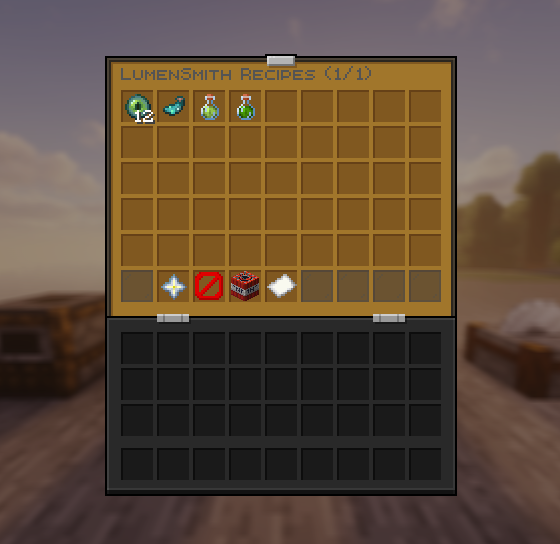
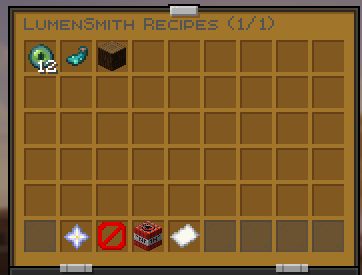
Type /ls in chat. The recipe browser opens immediately, with one icon per custom recipe and a navigation row at the bottom:
- Nether Star (visible to
lumensmith.create): start a new recipe. The inventory closes and chat asks for a key. - Barrier: switch to a Blocked Outputs view of
remove_by_output. Admins can click a blocked material to unblock it, or click an item in their own inventory to add it. - TNT (admin only): enter Delete Mode. The browser re-renders red. Shift-click any recipe to delete it from
config.ymland reload. Regular clicks just show a hint, so a fat-finger click can't nuke a recipe. - Page indicator and arrows: paginated, 45 recipes per page.
Step 2: click a recipe to inspect it
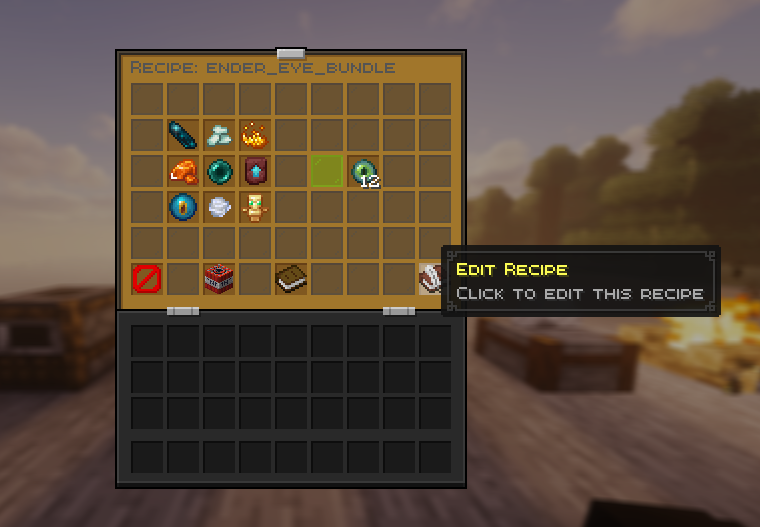
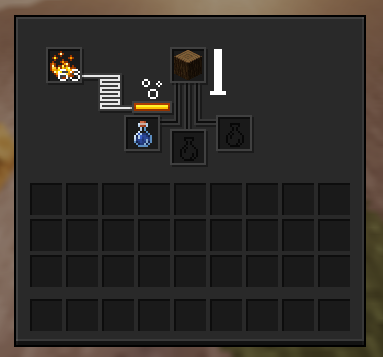
The detail view lays the recipe out the way you'd see it in vanilla (3x3 grid, smithing table layout, brewing stand layout, etc.) plus an info panel with cooldowns, permissions, and effects. Admins see an Edit button (writable book) and a Delete button (TNT).
Step 3: pick a category
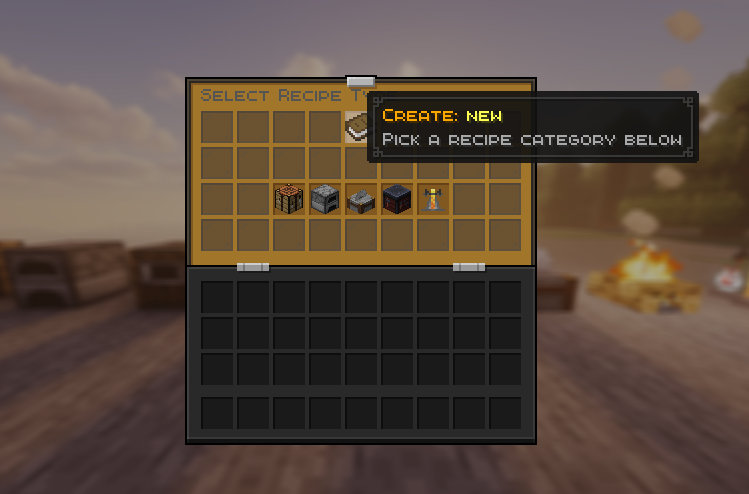
When you create a new recipe, the type selector opens with five categories instead of nine flat icons:
- Crafting: opens a sub-menu for Shaped / Shapeless / Adjacent Pair
- Cooking: opens a sub-menu for Furnace / Blasting / Smoking / Campfire
- Stonecutting: goes straight to the editor
- Smithing Transform: goes straight to the editor
- Brewing: goes straight to the editor
Step 4: build the recipe
The editor uses virtual slots: no real items are moved or consumed. Click a slot to select it, then click any item in your inventory to assign that material. Right-click a slot to clear it.
Common controls (visible based on the recipe type):
- Type button (top centre): go back to the category selector. Resets the work-in-progress.
- Ingredient slots: shaped uses a 3x3, smithing uses three slots, brewing uses two, cooking and stonecutting use one.
- Result slot (slot 24): the output material. Use the arrow next to it to change the result amount.
- Cooking controls (cooking recipes only): clock for cooking time, XP bottle for experience, bucket for allowed fuels.
- Direction toggle (adjacent-pair only): cycles between Horizontal, Vertical, and Both.
- Knowledge Book "Unlock Triggers" (every type): leave on Auto for sensible defaults, or click and pick custom triggers from your inventory. See How Auto-Unlock Works.
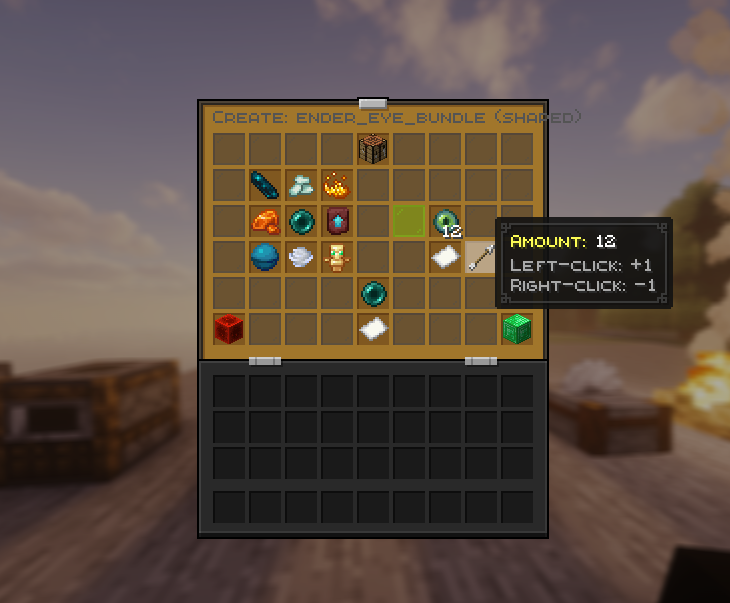
- Emerald (Confirm): validates and saves to
config.yml, reloads instantly. - Redstone (Cancel): aborts without saving.
Quick Start
- Download LumenSmith and place it in your server's
plugins/folder. - Start (or restart) your server.
- Type
/lsin-game. It opens the recipe browser straight away. - Click the green star to create a new recipe (you'll be asked for a key in chat).
- Need to edit
config.ymlby hand? Run/ls reloadafter changes.
/ls with no arguments opens the recipe browser. Type /ls help to see every subcommand.
Screenshots
Why LumenSmith?
- Built for SMP, RPG, and custom survival servers. Drop it in and shape crafting to your world.
- Custom brewing-stand recipes with any ingredient, including items vanilla normally refuses like logs, blocks, and tools.
- Redesigned in-game recipe creator with a categorised type selector. You never have to touch
config.ymlif you don't want to. - 100% YAML-based when you do, clean, commented, and human-readable.
- Fully reload-safe with
/ls reload, no restarts needed to test new recipes. - Blocks dupe and abuse paths by default. Removed vanilla recipes come back automatically the moment you take a custom one back out.
- Runs on Paper / Purpur 1.21.x and the new 26.x API line.
- Lightweight footprint, no external dependencies, clean console output.